Happy Mid-October! The cottonwoods and aspens have all turned red and gold out in the mountains - I'd say that's officially Fall.
If you haven't added the MCP yet, go get it! https://heyo.computer/product.html#mcp
The MCP lets your agent do all of the heavy lifting on Heyo Computer. If you want to deploy apps from Claude, this is the easiest path forward. It can also help you create and build custom Firecracker VMs, deploy static sites, manage security signals, and handle git remotes.
Deployments
Before we go any further, we'd like to introduce you to deployments. If you have ever used Kubernetes, you already get the idea. If not, the deployment is a basic definition of a workload. On Heyo, a deployment can be either a virtual machine workload, a static site (something you would normally serve via NGINX), or proxy upstream to another application.
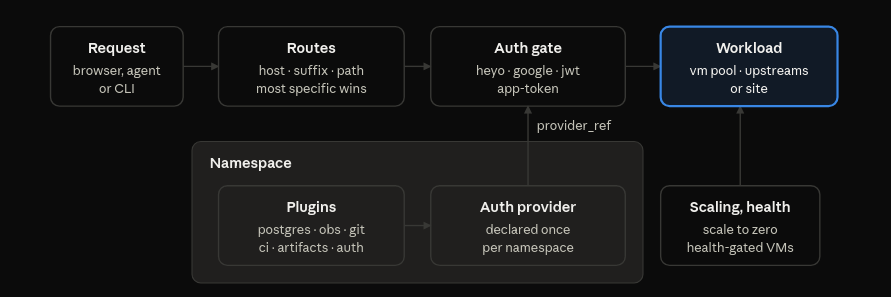
The deployment also defines scaling objectives - the default scalar in Heyo is a per-request target. That means we will attempt to keep a number of replicas of your app so that the average simultaneous connections meet a certain threshold.
In addition to the runtime and scaling behavior of a workload, the deployment also lets you configure the host your users will connect to, health checks, private and public routes, and authorization, which we'll get into in a moment.
Plugins
Create a new namespace, open the dash and navigate to the plugins section to view and install the currently available set (PS if you are self hosting, these are all available to install on your own deployment!). Plugins are components to solve challenges common to deploying most workloads on the web - they are packaged up here so that you or your agent can apply the ones that make sense for your workloads.
Heyo namespaces currently have access to the following plugins:
- Secrets vault
- Artifact store
- Git remote
- Observability
- Serverless Postgres
- CI
- Heyo Auth Provider
- Google Auth Provider
The MCP server additionally features tools for all of these, giving your agent an easy path for creating and configuring AI driven applications.
Auth Providers
Building authorization and multi-tenent applications greatly increases the complexity of an application - for small software projects that are dedicated to solving a hyper specific issue, why burn your tokens? Heyo lets you slap an auth gate onto the private parts of your application. The auth provider can be Heyo Computer, Google Auth or any provider that can issue a JWT, like your current IDP. The tokens can be verified in your API layer as well.
So go forth, vibe that bespoke email-triage-to-figma-design-for-fancy-chocolate app you've always wanted and apply the authorization system that you already use in your day to day.