Heyo Web Services (HWS) is the open-source stack that
builds a cloud on top of heyvm sandboxes: a load balancer and autoscaler for microVM
deployments, secrets, observability, an artifact store, CI, Postgres, a queue
and an MCP server, all running on hosts you control.
The API is inspired by Kubernetes so your agent already understands it. Namespaces are a basic container for organization and authorization and enable a suite of plugins for telemetry, git, databases and sign-in.
Heyo Computers publishes SDKs for building on top of as well, see:
@heyocomputer/hws on npm
and hws on crates.io. Start with the
HWS overview or go straight to
installation.
Get started with the CLI or MPC:
- The MCP server: connect Claude Code, Codex or any other
MCP client to
https://mcp.heyo.work/mcp, and your agent can deploy apps, run commands in VMs, move files, read logs and push images by itself. Nothing to install. - heyctl: a kubectl-style command line for the same
platform.
applydeclarative specs,scaleandrestartpools,execandshellinto VMs, readlogs, and manage secrets and tokens.
Both authenticate with a token confined to your namespace, which you create in
the namespace dashboard from app.heyo.computer. Programs
use the same API through the SDKs:
@heyocomputer/hws on npm
and hws on crates.io.
The App-LB
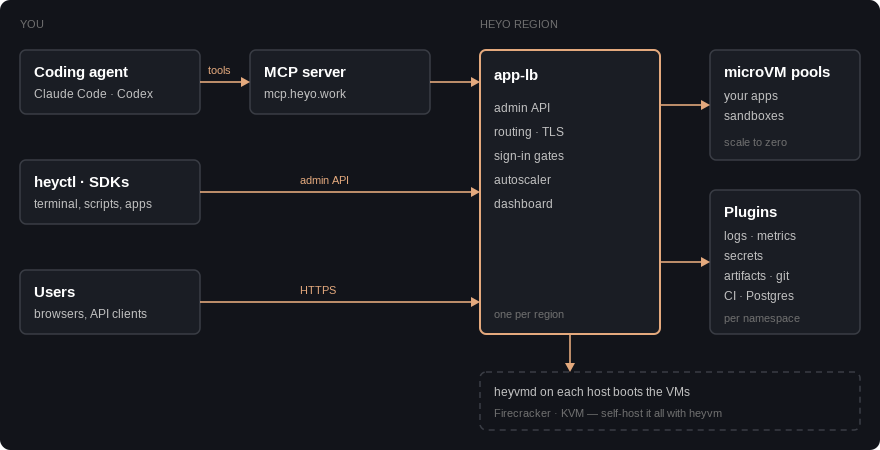
- app-lb is the load balancer and autoscaler at the center of every region. It routes requests, issues TLS certificates, boots VMs on demand, and serves the admin API that heyctl, the SDKs and the MCP server all use.
- Namespaces switch on plugins for telemetry, git repositories, databases and sign-in.
Self-hosting
Everything above is open source as Heyo Web Services
(HWS), and runs on hosts you control. Underneath it is the heyvm runtime:
heyvm: the CLI, TUI and local HTTP API that create and run sandboxes through pluggable virtualization backends (Firecracker, libvirt/KVM, Docker, Apple Virtualization, bubblewrap, WASM and more).heyvmd: a small always-on daemon that publishes a machine'sheyvmAPI over an iroh QUIC tunnel, so its sandboxes are reachable from anywhere.
You need these only to run sandboxes on your own machine or to operate your own region. Start with Install heyvm.
Where to go next
- Quickstart: connect your agent, install
heyctl, and deploy your first app. - MCP server: every tool, and how to run the server yourself.
- heyctl: the full command reference.
- SDKs: drive deployments from TypeScript or Rust.
- Heyo Web Services: run your own cloud on your own metal.
- CLI Commands and Virtualization Backends: the self-hosted
heyvmruntime.